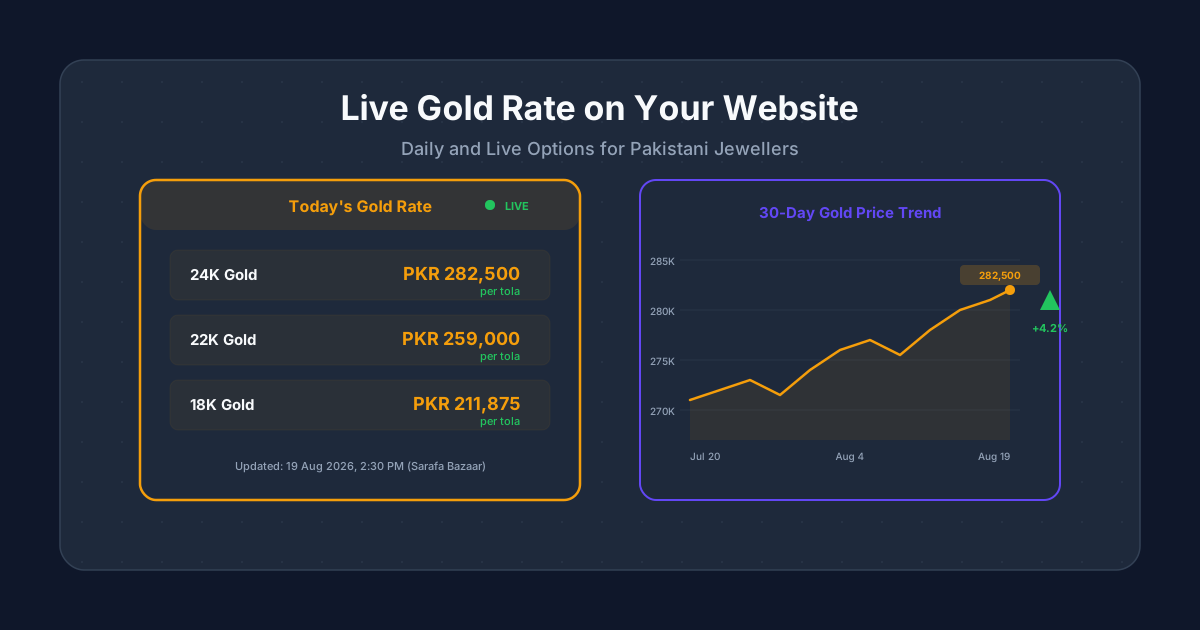
Pakistani jewellery buyers check gold rates before every purchase. If your jewellery website does not show today's gold rate, visitors leave your site, check the rate on another website, and may never come back. Adding a gold rate display to your website keeps visitors on your pages longer, builds trust, and positions your store as a reliable source of pricing information. This guide shows Pakistani jewellers exactly how to display a gold rate on your jewellery website, whether you want a live feed that updates automatically or a simple daily update you control manually.
Why Gold Rate Display Matters for Jewellery Websites
Gold prices in Pakistan change daily, sometimes multiple times a day. When a buyer visits your jewellery website, they want to know whether prices have gone up or down since last week. If your site shows a gold rate, the visitor stays on your site to browse products with the current price context. If it does not, they open a new tab, search for today's gold rate, and your website loses that visitor's attention.
Websites that display a gold rate on their jewellery website see measurably higher engagement. Visitors spend more time on the site because they have a reason to return daily. This repeated traffic signals to Google that your website is useful, which improves your search rankings over time. Some Pakistani jewellers report that their gold rate page is the most visited page on their entire website, bringing in thousands of monthly visitors who then browse products.
A gold rate display also reduces WhatsApp enquiries about pricing. Instead of answering 'What is today's gold rate?' fifty times a day, you point customers to your website. This saves time for your staff and drives traffic to your online store where visitors can see products alongside current prices.
Understanding Gold Rate Sources in Pakistan
Before you add a gold rate to your website, you need to understand where the rates come from and which source to use.
| Source | Update Frequency | Reliability | Cost | Best For |
|---|---|---|---|---|
| Sarafa Bazaar (local) | Multiple times daily | High for local market | Free (manual) | Jewellers who want Pakistan-specific rates |
| Pakistan Gems and Minerals Development Corporation | Daily | Official | Free (manual) | Jewellers who want government-backed rates |
| International gold API (e.g., GoldAPI.io) | Real-time | High | Free tier + paid plans | Websites needing automatic live updates |
| Forex/commodity APIs | Real-time | High for international rate | Varies | International gold rate converted to PKR |
| Scraping news sites | Varies | Low (breaks often) | Free but unreliable | Not recommended |
For most Pakistani jewellers, the Sarafa Bazaar rate is what buyers care about. International spot prices differ from local rates due to import duties, currency fluctuations, and local demand. If you display a gold rate on your jewellery website, make sure it reflects the price your customers will actually pay when they walk into your shop or place an order, not an international price that confuses them.
Option 1: Manual Daily Update (Simplest Approach)
The simplest way to display a gold rate on your jewellery website is to update it manually every morning. This requires no API integration, no coding skills, and no monthly fees. It works for any website platform including WordPress, Shopify, and custom-built sites.
- 1.Create a dedicated section on your homepage or a separate 'Gold Rate Today' page.
- 2.Every morning between 10 AM and 11 AM, check the Sarafa Bazaar rate from a trusted source (your local jewellers association WhatsApp group, ARY News, or Geo News business section).
- 3.Log into your website dashboard and update the rate for 24K, 22K, and 18K gold per tola and per gram.
- 4.Add the date and time of the last update so visitors know the rate is current.
- 5.If gold rates change significantly during the day (more than 500 PKR per tola), update again in the afternoon.
The downside of manual updates is obvious: if you forget to update for a day or two, visitors see stale rates and lose trust. You also need someone available every morning including weekends and holidays. For jewellers who want to display a gold rate on their jewellery website without daily manual work, automatic options are better.
Option 2: Semi-Automatic with a Simple CMS Widget
If your jewellery website runs on WordPress, you can use a custom field or a simple plugin to make updating rates faster. Instead of editing page content, you update a single field in your dashboard that automatically populates the rate across your entire website: homepage, product pages, sidebar, and footer.
- Use Advanced Custom Fields (ACF) plugin on WordPress to create fields for 24K rate, 22K rate, 18K rate, and last-updated timestamp.
- Build a simple widget template that reads these fields and displays a styled gold rate card wherever you place the shortcode.
- The update process takes 30 seconds: log in, change three numbers, click save. The rate updates across every page instantly.
- For Shopify stores, use metafields to store rates and a custom section in your theme to display them. Your Shopify developer can set this up during the initial build.
- For custom-built sites on Next.js or similar frameworks, store rates in a simple JSON file or a lightweight CMS like Sanity or Strapi. Update the file and the site rebuilds automatically.
Option 3: Fully Automatic Live Gold Rate Feed
For jewellers who want their gold rate to update automatically without any manual input, an API integration is the solution. An API connects your website to a data provider that sends the latest gold rate at regular intervals. This is the most professional approach and the one that keeps your website most accurate.
| API Provider | Free Tier | Paid Plans | Pakistan Rate | Update Frequency |
|---|---|---|---|---|
| GoldAPI.io | 50 requests/month | From $10/month | Yes (PKR conversion) | Real-time |
| Metals.dev | 50 requests/month | From $9/month | Yes | Every 60 seconds |
| MetalpriceAPI | 100 requests/month | From $10/month | Yes (PKR) | Real-time |
| GoldPriceZ | Unlimited (widget) | Free | Yes | Every 5 minutes |
| Custom scraper | Free | Maintenance cost | Sarafa rate possible | Configurable |
For a small jewellery website with moderate traffic, a free API tier with 50 to 100 requests per month is usually enough if you cache the rate and refresh every 30 to 60 minutes. You do not need real-time updates for a jewellery website because gold rates rarely change more than once or twice a day in the Pakistani market. Cache the rate on your server and serve the cached version to all visitors. This keeps API usage low and page load times fast.
Designing a Gold Rate Widget That Looks Professional
How you display the gold rate matters as much as the rate itself. A well-designed widget builds trust. A poorly designed one with Comic Sans font and clashing colours makes your whole website look unprofessional. When you display a gold rate on your jewellery website, the design should match your brand and feel like a natural part of the page.
- Show rates for 24K, 22K, and 18K gold per tola. These are the three karats Pakistani buyers care about most. Per tola is the standard unit in Pakistan; show per gram as secondary.
- Use a warm gold accent colour (#f59e0b or similar) for the rate numbers to visually associate them with gold. Keep the rest of the widget clean and minimal.
- Always show the date and time of the last update. A rate without a timestamp is useless because the visitor does not know if it is from today or last week.
- Add a small up or down arrow with the daily change amount. This gives buyers context on price movement and makes the widget more informative.
- Include the source: 'Sarafa Bazaar, Lahore' or 'International spot rate'. Transparency about where the rate comes from builds credibility.
- Make the widget responsive. On mobile, stack the rates vertically instead of side by side. Over 80% of your Pakistani visitors browse on phones.
Where to Place Gold Rates on Your Website
Placement determines how many visitors see and engage with your gold rate widget. The right placement increases page views, time on site, and return visits.
- 1.Homepage above the fold: The most impactful placement. Visitors see today's rate immediately when they land on your site. Use a compact horizontal bar or a sidebar widget.
- 2.Dedicated 'Gold Rate Today' page: Create a full page with today's rate, a 30-day price chart, and historical data. This page ranks well for search queries like 'gold rate today in Pakistan' and can bring significant organic traffic.
- 3.Product pages sidebar: Show the current gold rate next to your product listings so buyers can calculate the approximate value while browsing. This reduces the need to open a separate tab.
- 4.Sticky header or footer bar: A thin bar at the top or bottom of every page showing today's 22K rate. Always visible without taking up much space.
- 5.Blog posts about gold: When you write about gold trends or buying guides, embed the live rate widget within the article for immediate reference.
SEO Benefits of a Gold Rate Page
A dedicated gold rate page is one of the easiest ways to get consistent organic traffic to your jewellery website. Thousands of Pakistanis search for gold rate related queries every single day.
- "Gold rate today in Pakistan" gets tens of thousands of monthly searches. A well-optimized page can capture a share of this traffic.
- "Gold rate in Lahore" and similar city-specific queries have less competition. Create dedicated sections for major cities.
- "22K gold price today" and "24K price Pakistan" are long-tail queries that convert well because the searcher has a specific karat in mind.
- A price chart showing 30 days of historical data gives visitors a reason to bookmark your page and return daily, building a loyal audience.
- Add FAQ schema with common questions like 'What is today's gold rate per tola?' to appear in Google's featured snippets and People Also Ask boxes.
The key to ranking for gold rate queries is freshness. Google prioritizes pages that update frequently for time-sensitive queries. If your gold rate page updates daily (or automatically via API), Google will crawl it more often and rank it higher than static pages. This is why automatic updates through an API give you an SEO advantage over manual updates.
Adding a Price History Chart
A 30-day or 90-day gold price chart adds significant value to your gold rate page. Buyers want to know whether prices are trending up or down before making a purchase decision. A visual chart communicates this instantly.
- Use a simple line chart showing daily closing rates for the past 30 days. Libraries like Chart.js or Recharts make this easy to implement.
- Highlight the current rate with a dot and label at the end of the line.
- Show the percentage change over the period (e.g., '+4.2% this month') to give immediate context.
- For WordPress, plugins like wpDataTables or Visualizer can create charts from spreadsheet data. Update the spreadsheet daily.
- For custom sites, store historical rates in a database table and render the chart dynamically. Your developer can automate this during the website build.
- Keep the chart clean and simple. No 3D effects, no unnecessary gridlines, no distracting colours. Gold (#f59e0b) on a dark or white background is all you need.
Common Mistakes When Displaying Gold Rates Online
- 1.Showing stale rates. A gold rate from three days ago is worse than no rate at all. It makes visitors doubt everything else on your website. If you cannot commit to daily updates, use an automatic API instead.
- 2.Using international spot price without conversion. The international gold price and the Pakistani Sarafa rate are different. Showing the wrong rate confuses buyers and damages trust.
- 3.No timestamp. Without a date and time, visitors have no idea when the rate was last updated. Always show 'Last updated: [date] [time]'.
- 4.Cluttered design. Showing rates for every karat, every unit (tola, gram, ounce), in a massive table overwhelms visitors. Focus on 24K, 22K, and 18K per tola for Pakistani buyers.
- 5.Not showing making charges separately. Gold rate and making charges are different costs. Display them separately on product pages so buyers can verify the gold value against the displayed rate.
- 6.Rate page with no internal links. Your gold rate page gets traffic but that traffic bounces if there are no links to your products. Add links to your jewellery collections and popular categories directly below the rate widget.
Implementation Timeline and Cost
Here is what each approach costs and how long it takes to implement on your jewellery website.
| Approach | Setup Time | Monthly Effort | Cost |
|---|---|---|---|
| Manual daily update | 1-2 hours | 5 min/day | Free |
| CMS widget (WordPress/Shopify) | 4-8 hours development | 30 sec/day | 5,000-15,000 PKR setup |
| API integration (basic) | 1-2 days development | None (automatic) | 10,000-25,000 PKR setup + API fees |
| API + price chart | 2-3 days development | None (automatic) | 20,000-40,000 PKR setup + API fees |
For most Pakistani jewellers starting out, the CMS widget approach gives the best balance of cost and convenience. You update three numbers once a day and the entire website reflects the change. Once your site traffic grows and daily updates become a burden, upgrade to an API integration. If you are building a new jewellery website from scratch, ask your developer to include API-based gold rate display in the initial build so you do not pay for a separate integration later.