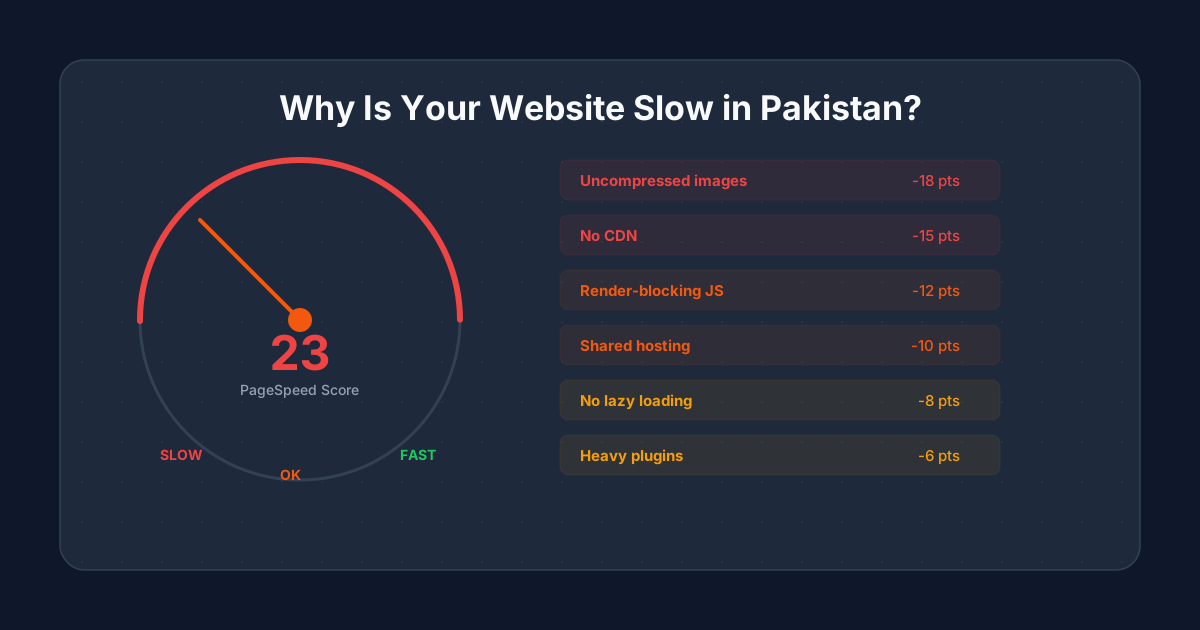
If your website takes more than three seconds to load, you are losing visitors before they see a single word. This problem is worse in Pakistan than in most markets because the majority of your visitors browse on mobile phones over 3G and 4G networks that are slower and less reliable than fixed broadband. A website slow in Pakistan is not just an inconvenience; it directly costs you customers, search rankings, and revenue. This guide covers the nine most common reasons websites load slowly in Pakistan and gives you a specific fix for each one.
How a website slow in Pakistan hurts your business
Before fixing anything, understand what a website slow in Pakistan actually costs you. Google's research shows that 53 percent of mobile visitors abandon a page that takes longer than three seconds to load. On Pakistani networks, where average connection speeds are lower than global averages, this threshold is even more critical.
Page speed also directly affects your Google rankings. Core Web Vitals, which include loading speed (Largest Contentful Paint), interactivity (Interaction to Next Paint), and visual stability (Cumulative Layout Shift), are ranking factors. A website slow in Pakistan ranks lower than a faster competitor with similar content, which means you lose traffic before visitors even reach your site.
The financial impact is measurable. Studies consistently show that every one-second delay in page load time reduces conversions by 7 to 10 percent. For a Pakistani e-commerce store processing 100 orders per day, a two-second speed improvement could mean 14 to 20 additional orders daily.
How to test if your website slow in Pakistan is real
Before diagnosing problems, measure your current speed. Use these free tools and always check the mobile score, not desktop, since most Pakistani users browse on phones.
- Google PageSpeed Insights (pagespeed.web.dev): the most important test. Enter your URL and check the mobile score. Below 50 is poor, 50 to 89 needs improvement, 90+ is good
- GTmetrix (gtmetrix.com): provides waterfall charts showing exactly which resources take the longest to load. Change the test location to a server closer to your audience
- WebPageTest (webpagetest.org): allows you to test from specific locations and connection speeds. Select a 3G or 4G connection to simulate Pakistani mobile conditions
- Chrome DevTools: open your website in Chrome, press F12, go to the Network tab, and set throttling to "Slow 3G" to experience what your Pakistani visitors see
1. Uncompressed images: the top reason your website slow in Pakistan
This is the number one reason websites are slow in Pakistan. Business owners or developers upload high-resolution images directly from a camera or phone without any compression. A single uncompressed product photo can be 3 to 8 MB, and a page with five such images forces the visitor to download 15 to 40 MB of data before the page renders.
On a Pakistani 4G connection averaging 10 to 15 Mbps, that is 8 to 30 seconds of loading time just for images. On 3G, it is even worse. Meanwhile, a properly compressed image delivers the same visual quality at 50 to 200 KB, loading in under a second.
- Convert all images to WebP format, which is 25 to 35 percent smaller than JPEG at the same quality
- Resize images to the maximum display size. A hero image does not need to be 4000px wide if it displays at 1200px
- Use lazy loading so images below the fold load only when the visitor scrolls to them. WordPress has native lazy loading; add loading="lazy" to image tags on custom sites
- Use responsive srcsets so mobile devices download smaller images than desktops
- For jewellery websites and product-heavy stores, implement an image optimisation pipeline that automatically compresses and converts uploads
2. Shared hosting that cannot handle your traffic
Most Pakistani businesses start on shared hosting plans costing 3,000 to 8,000 PKR per year. Shared hosting means your website shares server resources (CPU, RAM, bandwidth) with hundreds of other websites on the same machine. When any of those sites get traffic spikes, your site slows down too.
The problem gets worse during peak hours. Between 8 PM and midnight, when most Pakistanis browse the internet, shared servers are under maximum load. Your website slow in Pakistan during evening hours is almost certainly a hosting problem.
- Upgrade to a VPS (Virtual Private Server) for 8,000 to 25,000 PKR per year. You get dedicated resources that other sites cannot consume
- Consider cloud hosting (DigitalOcean, Vultr, AWS Lightsail) for 10,000 to 30,000 PKR per year with automatic scaling
- Choose a server location close to Pakistan. Singapore, Mumbai, or Middle East data centres give Pakistani visitors faster response times than US or European servers
- If budget is tight, at minimum upgrade to a premium shared hosting plan with fewer sites per server and SSD storage
3. Heavy WordPress themes and page builders
WordPress themes sold on ThemeForest and similar marketplaces are built to demonstrate as many features as possible. They include sliders, animations, parallax effects, custom fonts, icon libraries, and page builder frameworks, all loaded on every page whether you use them or not.
A typical multipurpose theme adds 2 to 5 MB of JavaScript and CSS to every page load. That code must be downloaded, parsed, and executed before your page becomes interactive. On a Pakistani mobile device with limited processing power and a slow connection, this bloat makes the website painfully slow.
- Switch to a lightweight theme like GeneratePress, Astra, or Kadence that loads under 50 KB of CSS and minimal JavaScript
- Avoid page builders (Elementor, WPBakery, Divi) for production sites. They add significant overhead to every page
- If you cannot switch themes, use a plugin like Asset CleanUp to disable unused CSS and JavaScript on specific pages
- For businesses where speed is a competitive advantage, consider a custom built website that loads only the code each page actually needs
4. Too many WordPress plugins
Every WordPress plugin adds PHP execution time, database queries, and often its own CSS and JavaScript files. A site with 30 to 50 plugins, which is common on Pakistani business websites, has so much overhead that the server spends more time processing plugin code than serving your actual content.
The issue is not just quantity but quality. Poorly coded plugins can add hundreds of milliseconds to every page load with unnecessary database queries, external API calls, or unoptimised assets.
- Audit your plugins and deactivate everything you do not actively use. Then delete deactivated plugins completely
- Replace multiple single-purpose plugins with one well-coded alternative. For example, one good SEO plugin replaces separate plugins for meta tags, sitemaps, breadcrumbs, and schema
- Check if your theme already includes features you have installed plugins for (contact forms, sliders, social sharing)
- Use Query Monitor plugin to identify which plugins add the most database queries and slow down page generation
- Target 10 to 15 essential plugins maximum. If your site needs more, the theme or platform may not be the right fit
5. No caching configured
Without caching, your server rebuilds every page from scratch for every visitor. WordPress executes PHP code, queries the database, assembles the HTML, and sends it to the browser, all of which takes time. Caching stores the finished HTML so subsequent visitors get the pre-built page instantly.
A website slow in Pakistan without caching is like a restaurant that cooks every dish from raw ingredients for every order when it could prepare components in advance. The impact is dramatic: proper caching can reduce page load time by 50 to 80 percent.
- Install a caching plugin: WP Super Cache (free, simple), W3 Total Cache (free, more options), or WP Rocket (paid, easiest to configure)
- Enable browser caching so returning visitors do not re-download assets they already have
- Enable GZIP or Brotli compression to reduce the size of HTML, CSS, and JavaScript files sent to the browser
- If your hosting supports it, enable server-level caching (Varnish, Redis, or LiteSpeed Cache) for even faster responses
- For Shopify stores, caching is handled automatically by Shopify's CDN. For custom Next.js sites, pages are pre-rendered at build time and served as static files
6. No CDN (Content Delivery Network)
Without a CDN, every visitor downloads your website from a single server, which might be located in the US or Europe. A Pakistani visitor requesting data from a US server experiences 200 to 400 milliseconds of latency just from the physical distance the data travels, before any content starts loading.
A CDN copies your website's files to servers around the world. When a Pakistani visitor loads your site, they get files from the nearest CDN server (typically Singapore or Mumbai), reducing latency to 20 to 50 milliseconds. This alone can shave one to two seconds off your page load time.
- Cloudflare offers a free CDN plan that works with any website. Setup takes 15 minutes and requires changing your domain's nameservers
- BunnyCDN is a low-cost alternative at roughly USD 1 per month for most Pakistani business websites
- If you are on WordPress, Cloudflare integrates with most caching plugins for combined benefits
- A CDN also provides DDoS protection and SSL, which are additional benefits beyond speed
7. Render-blocking JavaScript and CSS
When a browser loads your page, it stops rendering whenever it encounters a JavaScript or CSS file that must be downloaded and processed before anything else can display. These are called render-blocking resources, and they are a major reason your website slow in Pakistan feels unresponsive even when the total file size is reasonable.
Common culprits include Google Fonts loaded synchronously, analytics scripts in the document head, social media widgets, chat plugins, and third-party tracking scripts. Each one adds a blocking request that delays the first meaningful paint of your page.
- Move non-critical JavaScript to the bottom of the page or add the defer or async attribute
- Load Google Fonts with display=swap so text renders immediately in a fallback font while the custom font downloads
- Defer loading of third-party scripts (chat widgets, analytics, social buttons) until after the main content has rendered
- Inline critical CSS (the styles needed for above-the-fold content) directly in the HTML head so the browser does not wait for a separate CSS file
- Use Google PageSpeed Insights to identify exactly which resources are blocking rendering on your site
8. Database bloat and unoptimised queries
Over time, a WordPress database accumulates post revisions, spam comments, transient options, orphaned metadata, and logs from plugins you no longer use. A bloated database means every page load requires more time to query and retrieve data.
This problem is invisible to most website owners because the slowdown is gradual. A site that loaded in two seconds when launched may take four seconds a year later, not because anything was added to the front end, but because the database grew from 10 MB to 500 MB with unused data.
- Use WP-Optimize or Advanced Database Cleaner to remove post revisions, spam comments, and transient data
- Limit post revisions in wp-config.php: define('WP_POST_REVISIONS', 5) keeps only the last five revisions per post
- Schedule automatic database optimisation to run weekly
- If your site uses WooCommerce, clean up expired sessions and old order logs regularly
9. No HTTP/2 or HTTP/3 support
HTTP/1.1, the older protocol, loads resources one at a time per connection. A page with 50 resources (images, scripts, stylesheets) creates a queue where each file waits for the previous one to finish. HTTP/2 and HTTP/3 load multiple resources simultaneously over a single connection, which dramatically reduces total load time.
Many Pakistani hosting providers still default to HTTP/1.1 unless you specifically enable HTTP/2. This one configuration change, which costs nothing, can reduce page load time by 20 to 40 percent for resource-heavy pages.
- Check if your hosting supports HTTP/2 (most modern hosts do) and enable it in your server configuration
- If using Cloudflare CDN, HTTP/2 and HTTP/3 are enabled automatically on all plans including the free tier
- HTTP/3 (QUIC) is particularly beneficial for Pakistani mobile users because it handles packet loss better than TCP, which is common on 3G and 4G networks
Fix your website slow in Pakistan: optimisation checklist
Work through this list in order. Each fix builds on the previous one, and the items at the top deliver the biggest improvement for the least effort.
- 1.Compress and convert all images to WebP with lazy loading (biggest single impact)
- 2.Install and configure a caching plugin (WP Rocket or LiteSpeed Cache)
- 3.Set up Cloudflare CDN (free, 15-minute setup)
- 4.Remove unused plugins and deactivate features you do not use
- 5.Defer render-blocking JavaScript and load fonts with display=swap
- 6.Enable GZIP or Brotli compression on your server
- 7.Upgrade hosting if you are on a cheap shared plan and still seeing slow server response times
- 8.Clean up and optimise your database
- 9.Switch to a lightweight theme if your current one loads more than 1 MB of CSS and JavaScript
When optimisation is not enough
Sometimes the platform itself is the bottleneck. A WordPress site built on a heavy theme with a page builder, 40 plugins, and shared hosting has a speed ceiling that no amount of optimisation can break through. You can compress images, add caching, and enable a CDN, but if the foundation is bloated, you will plateau at three to four seconds on Pakistani mobile networks.
In these cases, a website rebuild on a clean WordPress theme or a custom Next.js build delivers the speed improvement that optimisation alone cannot. A custom built site loads only the code each page needs, pre-renders pages at build time, and serves them from edge servers. The result is sub-second load times even on Pakistani 3G connections.
For a comparison of how each platform handles speed, see our guide on WordPress vs Shopify vs custom code.